Every server you run, steady in one console.
ServerKeel is a self-hosted control panel for your whole fleet. Machines, sites, DNS, logins, hosting panels, apps and domains live in one place, and Claude does the legwork. It runs on your own hardware, and you own the license.
In early access, winter 2026. Works with Linux servers, Proxmox, Plesk and cPanel.
12 of 13 online
web-03 stopped answering at 23:12
Looking into web-03…
Machines last 15 min
Pick up where you left off
Client portal: Caddy change on web-02 is staged, not reloaded yet.
What keeps it steady sits below the waterline.
Each server runs one small agent. Your console runs on a machine you control. Nothing in between belongs to us.
Your ServerKeel
- Panelthe console you use
- Gatewayagent streams
- Postgresfleet data
- Log storesearch every log
One Docker Compose stack on hardware you control.
Agents dial out
The agent opens an encrypted gRPC stream to your console. You don't open inbound ports or SSH on any server, and it works behind NAT.
One stack, your box
Panel, gateway, database and logs ship as one compose file. Back it up or move it to a new box with one script each, and run a second gateway if you want agents to keep connecting through an outage.
Licensed, not hosted
A signed license key is checked on your own box. A daily check-in fetches renewals and never sends your fleet's data.
One console instead of eleven browser tabs.
The tools you already juggle, from the Proxmox UI to Cloudflare to your registrar, become modules that share one picture of your fleet.
See the fleet
- Machines
- CPU, memory, disk and network per server, an event timeline, and every container with logs and restart.
- Map
- Live topology from Cloudflare to every VM and container. Rewind the last hour to see when something broke.
- Alerts
- Offline, disk, memory, CPU, sites down and certificates, sent to email, Slack, Discord, ntfy or a webhook.
- Logs
- One search over every journal, web server and container log, with live tail and alerts on any search.
- Uptime and status pages
- Monthly reports per client and public status pages on their own domain.
Work on it
- Terminal
- A root shell in the browser over the agent's own connection. Every session is recorded and can be replayed.
- Sites
- Every site checked each minute: status, response time, certificate days left. Caddy edits are validated before reload.
- App Store and web stack
- 92 free apps in one step, plus Nginx, Apache, OpenLiteSpeed or Caddy with PHP and Node.js. No Plesk or cPanel needed.
- Hosting
- Every Plesk and cPanel account in one table. Sign in as the owner, or move an account onto your own stack.
Keep it in order
- Logins
- An encrypted vault that finds credentials in .env and config files, and logs every reveal and copy.
- DNS
- Cloudflare zones and records, each matched to the server it points at, with SSL mode checked against reality.
- Domains
- Search, register, renew and transfer through eNom and ResellerClub, without opening the registrar.
- Projects
- Where each project lives, where you left off, and a daily journal of commits, shells and Claude Code sessions.
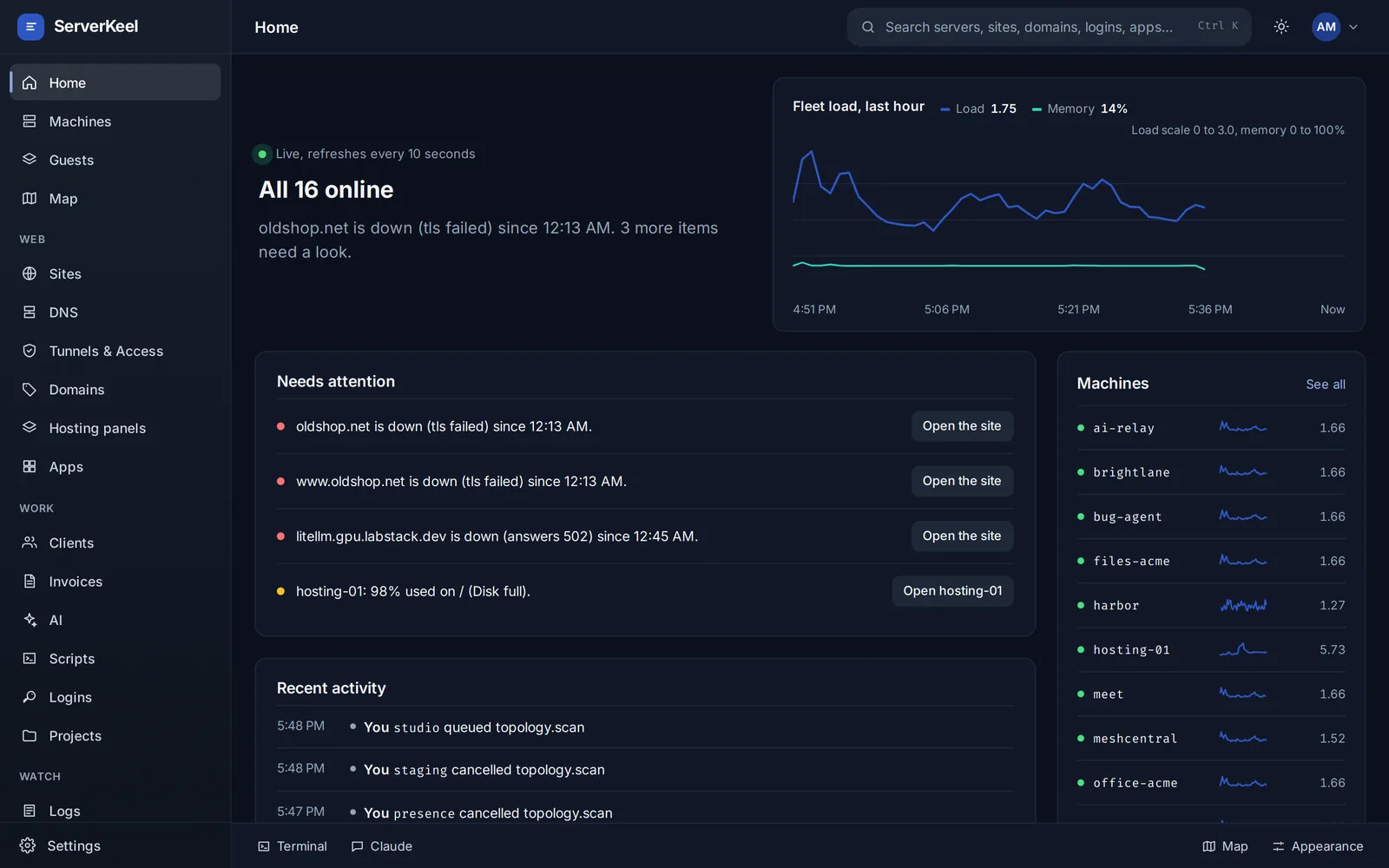
This is the real console.
Screenshots from a demo console with made-up names. Every screen works in light and dark.
Claude does the legwork. Nothing runs until you approve it.
Connect your own Claude account and it works inside the console with the same view of the fleet that you have.
It investigates
When a server stops answering or a certificate nears expiry, Claude reads the logs and metrics before you open a terminal.
It shows the evidence
You see the exact commands it ran and the output it got, not a summary you have to take on trust.
It proposes a fix and waits
The proposal shows up on Home with Approve and Decline. Nothing on a server changes until a person approves it.
| 23:14 | ReadClaude read 2,400 lines of journal on web-03 |
| 23:15 | AskedClaude proposed docker builder prune on web-03 |
| 23:16 | ApprovedYou approved and ran it. 38.6 GB freed, site back up. |
| 09:02 | AskedClaude proposed restarting php8.3-fpm on web-02 |
| 09:03 | DeclinedYou declined. Claude left a note in the project journal. |
Yours to run. Licensed, not rented.
ServerKeel is sold as software you install, never as a hosted service. Choose how you'd like to pay for it.
Yearly license
Pricing published at launch
- Every module and every update while it's active
- Support from the people who build it
- Stop any time; your data stays on your servers
One-time license
Pricing published at launch
- Pay once, with a year of updates included
- Runs on your servers for as long as you want
- Keep running your version after the update year ends
Both licenses install the same way: one Docker Compose stack and a signed license key, read the license agreement. Early-access teams help decide what ships first.
Questions we hear first
Is ServerKeel a cloud service?
No. You install it on a server you control, at the office, in a rack or on a VPS. We don't host it, and we don't receive your fleet's data.
What do I need to run it?
A Linux machine with Docker. The console is one compose stack. Each managed server gets a small agent that installs with one command and connects out to your console.
Does it replace Plesk or cPanel?
It can do either. You can keep your panels and manage every account from one place, or use the built-in web stack and App Store instead. Move copies a cPanel or Plesk account, with sites, databases, mail and cron jobs, onto a server you run.
What can Claude do on my servers?
Claude can read what the console shows you, run safe checks such as ping and system info, search logs and propose changes. It never sees secret values, and anything that changes a server waits for a person to approve it. Everything is written to the audit log.
Which Claude account does it use?
Your own. You connect ServerKeel to Claude as an MCP connector, so there is no separate AI bill from us.
Can I keep a backup console?
Yes. One script backs up the database, files, certificates and settings, and another restores them on the same box or a new one. Agents reconnect on their own. You can also run two gateways so agents stay connected if one stops.